See the input photos and actual 10-second outputs before you buy. Both sample adults are AI-created fictional people; these are not customer uploads or testimonials.
These clips were generated by this tool using an AI-created fictional adult. Input photo and actual result, side by side.
Everyday photo to Midnight Witch
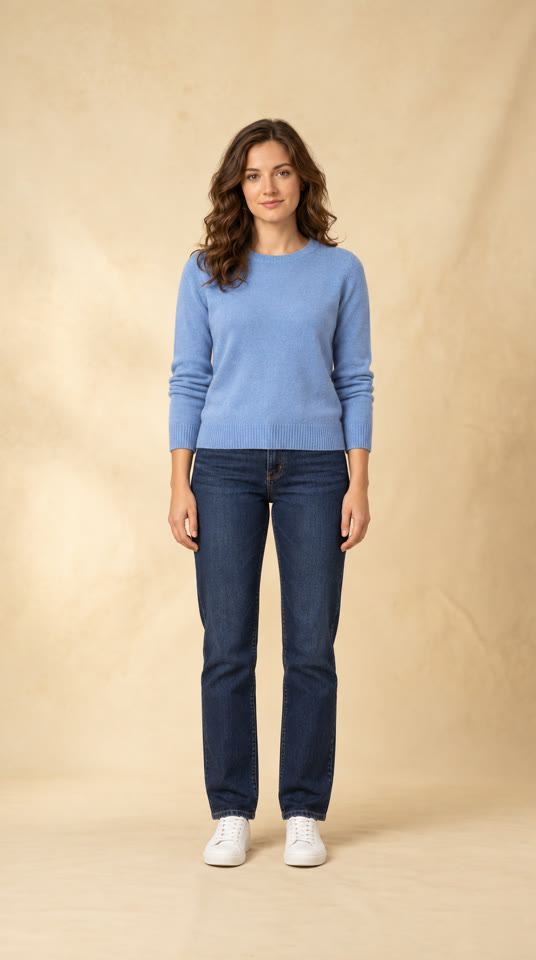
Input photoActual output · 10 seconds · silent
What this sample starts with
The shown starting image is a 536 × 960 JPG: one fictional adult facing the camera in a blue sweater, jeans and white shoes, with a plain background. The full body, hands and shoes are visible. This illustrates the everyday-photo route.
What to look for in the result
In this output, everyday clothing becomes a black witch outfit with a pointed hat, and the setting changes to a cobbled street. The adult holds a lantern. The video opens with the outfit already applied: it does not show clothes changing on screen.
Published sample file
Video dimensions
536 × 960 px
File duration
10.04 seconds
File size
0.88 MB
Format / codec
MP4 / H.264
Audio track
None — silent
A witch portrait brought to life
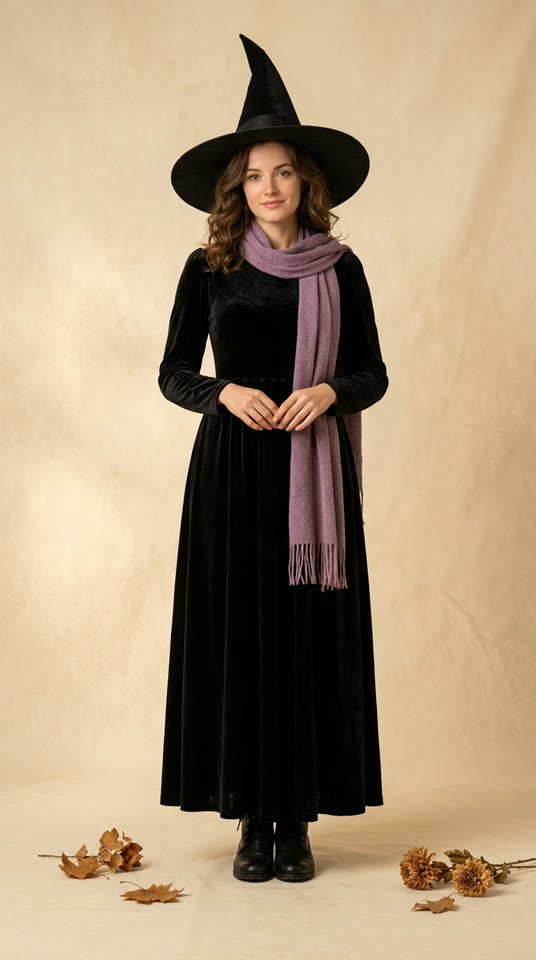
Input photoActual output · 10 seconds · silent
What this sample starts with
The shown starting image is also a 536 × 960 JPG. This fictional adult already wears a black witch dress, hat, purple scarf and boots. The face, hands and footwear are visible. This is a styled starting portrait, not a second demonstration of casual clothing turning into a costume.
What to look for in the result
In this output, the witch portrait is animated in a street setting; the black outfit and purple scarf remain visible. Compare this with the everyday-photo example to understand the two starting points. Neither clip guarantees the same face details, clothing details or movement for another photo.
Published sample file
Video dimensions
536 × 960 px
File duration
10.04 seconds
File size
1.17 MB
Format / codec
MP4 / H.264
Audio track
None — silent
Midnight Witch is the available style. Results vary by photo; these samples show actual output from this tool.
These are the measured specifications of the two public sample files shown here. File size and resolution are not a guarantee for every generation, and file duration does not describe generation time.
Use these examples to decide before paying
Compare your photo’s framing with the starting images. If the face is hidden, the body is cropped or the lighting is dark, choose a clearer photo before starting a paid generation. The full guide below explains what to look for.
Play each clip and look at the face, hands, outfit and movement. This is an AI costume interpretation, not an exact identity-preservation promise or a physical clothing try-on. Only the Midnight Witch style shown here is available.
The files contain no audio track. If the effect you want depends on music, a specific dance or a visible outfit-change moment, these examples do not demonstrate that effect. Choose based on the output you can actually see, rather than the name of a social trend.
Choose a photo for your witch costume walk
A clear starting photo helps. These are photo-selection tips, not a guarantee of an identical result.
A good starting point
One consenting adult, standing and facing the camera.
A full-body photo with hands and shoes visible, with room around the person.
Even light, a clear face and a simple background. An everyday photo is fine.
Choose a different photo if possible
Group shots, a face hidden by objects, or a person turned away from the camera.
Seated poses, cropped legs or shoes, blur, or very dark lighting.
Heavy filters or previous AI edits that obscure the person’s appearance.
JPG, PNG or WebP, up to 10 MB. You must be 18 or older and have the adult’s permission to edit their photo. Your upload is not published as a public example.
Where to use your 10-second costume video
Download a silent vertical MP4, then choose how to share it.
TikTok and Instagram Reels
Upload your downloaded video in the social app. Add music there if you wish, using audio you are allowed to use. The costume is already applied when the video starts; the clip does not synchronize its movement to added music.
Stories and Halloween messages
Share a short Midnight Witch look with friends or in a Halloween Story. If you make a before-and-after edit, label it as AI-generated. Save the original MP4 so you can edit or share it again.
What your 10 credits create
A one-time $4.90 purchase gives you 10 credits for one 10-second silent Midnight Witch costume walk, delivered as a vertical MP4. Sign in and verify your email before buying; when generation is complete, play the result in the studio and download it.
The costume is applied from the opening frame. Music, beat matching and an on-screen outfit transformation are not included. Only Midnight Witch is available, and appearance and movement vary by photo.
Confirmed generation failures return the original task credits automatically. An uncertain submission must be checked first. Returning credits is different from refunding a payment; the price page explains the full rules.
We use cookies to improve your experience, analyze site usage and support our marketing. You can accept or reject non-essential cookies; essential cookies needed for sign-in always stay on.